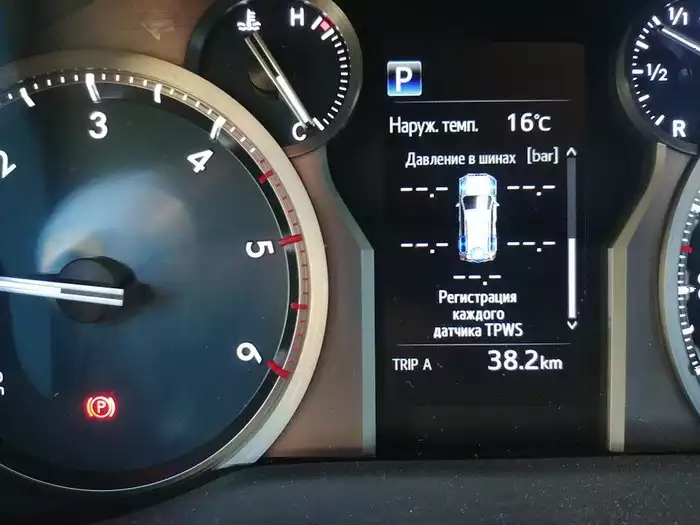
We decided to share our experience of solving the problem with registering tyre pressure sensors on the 2020 Toyota Prado 150 (second restyle). Here’s how it went.
Since we had a set of metal wheels lying around, we decided to put winter tires on them and, if necessary, simply swap the wheels as a whole. This is convenient in every way:
- No need to participate in the seasonal rush at tire service centers. Retooling with prior booking, loading, and unloading the tires takes half a day anyway.
- No need to pay twice a year for tire changes.
- You can save the life of winter tires by putting them on at the first snowfalls and removing them as soon as the weather becomes reasonably warm.
It seems simple and clear. The remaining issue is the car’s tyre pressure system. Information on forums and other sites is scarce, because only from the second restyle of the Toyota Prado 150 (starting 2017–2018) there is a feature for automatic registration of a second set of pressure sensors without visiting a service station, connecting a computer, or cloning sensors.
Second set of pressure sensors
The original tyre pressure sensor set is several times more expensive than non-original ones. Why pay more? I bought a set on OLX in autumn 2022 for 2,000 UAH (about 50 USD) for four sensors.
Looking ahead, these sensors report to the car’s computer about twice as fast after engine start compared to the original Toyota sensors. I don’t know why, but it’s convenient. This is noticeable because now I have four Chinese sensors in the wheels and one original in the spare. When all sensors were original, data appeared simultaneously. Now the spare sensor lags significantly.
We recommend writing down and photographing the sensor numbers before mounting them on the wheels and installing the tires. If anything goes wrong, these codes can be manually entered into the car’s computer.
Next, we follow the instructions.
- Install the second set of wheels with tires on the car.
- With the ignition on or the engine running, briefly press the «harp» button three times. It is located above the brake pedal and is visible only if you look under the dashboard. The tyre pressure indicator on the dashboard will blink, and the display will show “Registration of each TPWS sensor.”
- Drive at speeds above 40 km/h for approximately 30 km. The exact speed is not important, but the duration matters. Registration takes about 30 minutes.
- New sensor readings along with the spare wheel’s reading will appear on the display.
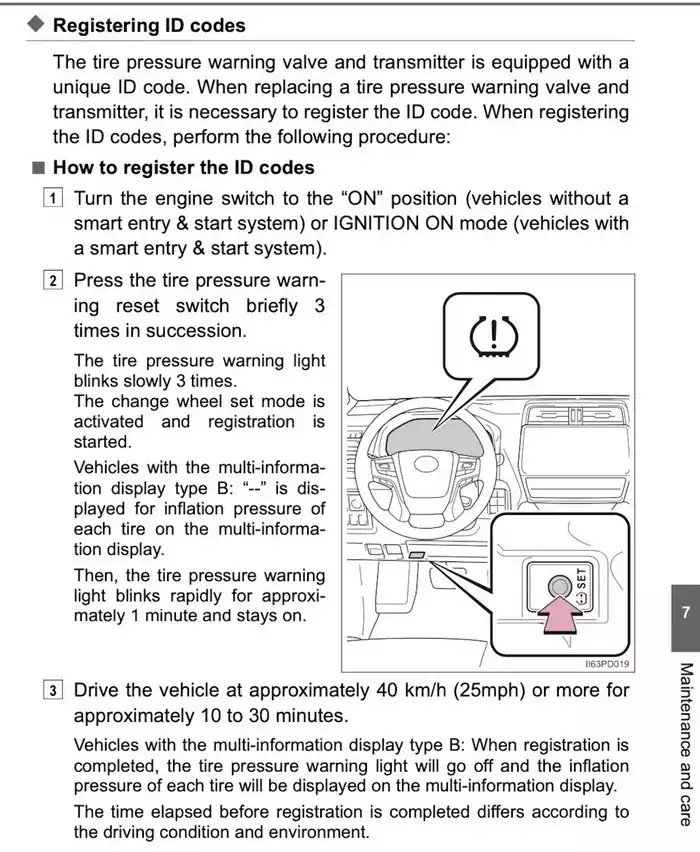
Note! It is not necessary to drive continuously until the sensors are successfully registered after pressing the «harp» button three times. Pressing the button three times starts the registration process. Then you can drive and stop the car as usual. After restarting the engine, you do not need to press the «harp» button again. Use the car normally; the pressure sensors will eventually register in the TPMS system.
Why pressure sensors may fail to register
We encountered a problem where the car system stubbornly did not detect the new pressure sensors. I began to suspect that one or more of the new sensors were defective.
We could not find sufficient information online. Many posts from “experts” claim the system works only with previously registered sensor sets. Some say sensors must be driven only on highways and will not register in the city. For some, registration works immediately; others had to drive up to 1,500 km.
Overall, the situation is unclear. After reading various forums, I hypothesized that poor sensor registration in urban areas is caused by radio interference. Some suggested interference from other cars’ sensors, but that seems unlikely, as these systems are still rare. Therefore, something else must be causing interference.
While investigating, Google began showing ads for external Bluetooth-based tyre pressure systems. This led me to another hypothesis: perhaps Bluetooth connections with the car’s infotainment system interfere with sensor registration.
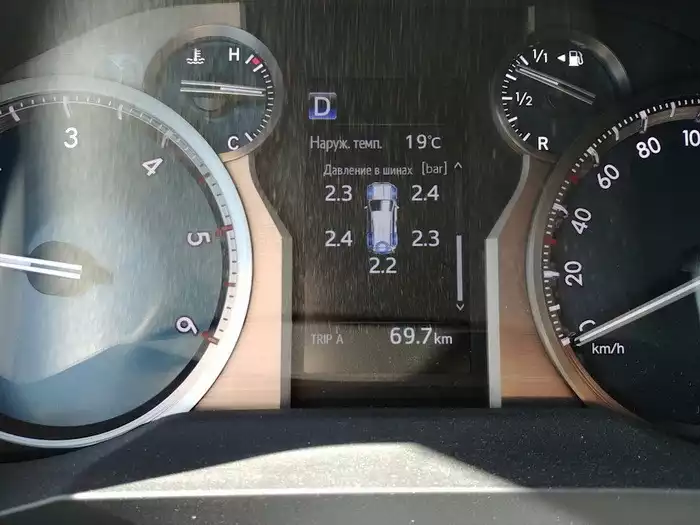
Indeed! I turned off Bluetooth on the phone, drove 30 km at about 60 km/h, and voilà — the display correctly showed readings from the new sensors.
If you have trouble registering sensors on the second restyle Toyota Prado 150, turn off all devices in the cabin that could cause radio interference, especially your phone’s Bluetooth.
Do you need to re-register sensors when changing to summer tires?
The question remains: how many tyre pressure sensors can the second restyle Prado 150 remember? Earlier versions reportedly stored only five IDs, requiring manual updates or cloning of both sets each time. For us, the focus is solely on the second restyle.
Before discovering the Bluetooth solution, I had ordered a mini-VCI cable to connect a laptop to the car’s computer. I planned to check for errors and see why the sensors failed, or, as a last resort, disassemble the tires, check sensor IDs, and manually enter them as was done with previous Prado 150 versions.
Since the sensors eventually registered, none of that was necessary. Connecting the laptop revealed that the system memory allows storage of 10 sensor IDs. Initially, only installed sensors were visible, but the menu also referenced a second set of five. Most likely, all 10 IDs are stored, so switching to summer tires requires no additional action.
In spring 2023, when changing the wheel set, I will update this article. Even if re-registration is needed, it will no longer be an issue. Update! After changing to summer tires, I did not wait for the car to automatically recognize the second set, as I drove only a short distance. Nevertheless, the sensors registered quickly and easily using the standard procedure.
What is TPMS initialization on the Prado 150?
Finally, a bit more information. The car manual includes two sections on the tyre pressure system: initialization and registration. What’s the difference?
It’s simple. Registration is required when installing sensors not previously used on the car or when using more than 10 different wheels/sensors periodically.
Initialization is the system’s adjustment to your preferences. Some prefer inflating tires to 2.3 or 2.4 bar, others to 2.0. I follow the manufacturer’s recommendation of 2.1 bar. To make the system recognize your preferred pressure as normal, inflate the tires accordingly and hold the «harp» button for three seconds. After this, drive a short distance for proper system calibration. During this time, the display may temporarily show incorrect readings or flash the harp symbol — this is normal.
Once again, all information in this article regarding tyre pressure sensor registration applies only to the second restyle Prado 150. Earlier versions do not have these features.
Another option!
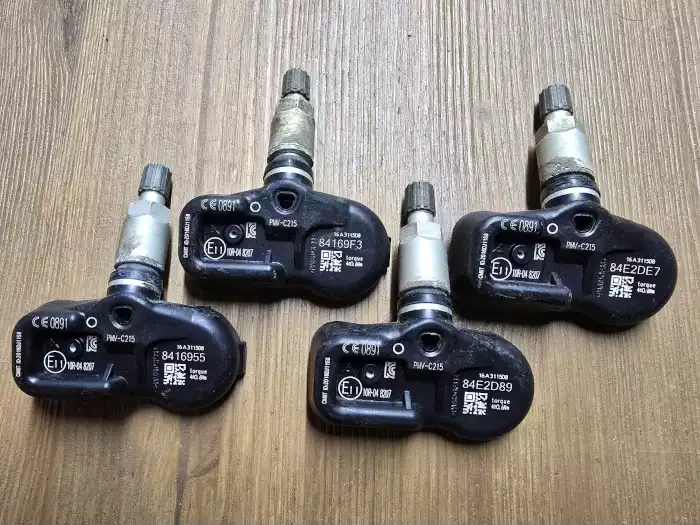
Another solution is to visit a service station, where specialists can connect to the car’s on-board computer and manually enter the IDs of the new sensor set.
However, there are nuances. Often, sensors are already installed on a second set of wheels, but their IDs are unknown. In that case, you would have to pay not only for TPWS reprogramming, but also for full tire service: dismounting, recording sensor IDs, reassembling, balancing, and reinstalling. Why pay for something that can be done easily yourself?
To register a new set of sensors, you only need a Mongoose adapter and the sensor serial numbers. In the photo above: 84169F3, 84E2DE7, 8416955, 84E2D89. When entering these IDs in TechStream, the interface asks you to assign each sensor to a wheel. In practice, the system will automatically detect and assign sensors to the correct wheels after a short drive, storing the data in the TPMS memory.
Besides programming pressure sensors, the scanner allows configuration of many vehicle parameters and reading errors for diagnosing all vehicle systems.